Swiftpoint Mouse Aims to Replace Your Laptop's Touchpad

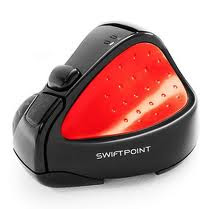
Gearzap has just announced the release of their tiny award-winning mouse that is designed to make cursor pointing while on to go much easier. Called the SwiftPoint, this tiny mouse is touted to be comfortable and ergonomic to hold and intuitive to use. The SwiftPoint is held just like a pen and 30-40% more efficient than a touchpad, making it perfect for tasks like Photoshop and gaming.
It is less bulky than a regular wireless mouse, and requires much less surface area to function. In fact you can even use it on your lap if you don’t have anywhere else to place it. The charging dock even has a special 30-second charge gives you a full hour of use especially useful during emergencies. Hit the break to watch  demo video of the SwiftPoint in action. It is available now for $81(£49.95).

read more “Swiftpoint Mouse Aims to Replace Your Laptop's Touchpad”

WIN&I Replaces Your Mouse with the Kinect Sensor

In one of more useful ways to utilize the Microsoft Kinect gaming sensor, Evoluce, creators of the I-voluce (a motion controlled HD LCD TV) has released the some new software that will allow you to control your Windows 7 computer with hand gestures. All you have to do is install WIN&I on your Windows 7 PC, hook it up with a Kinect, learn the required gestures and you’re good to go.


While you’ll still need to use a keyboard to input text, you no longer need to use the mouse again for simple tasks such as reading websites or changing your music. WIN&I comes in two flavors Home Edition and Business Edition that adds gesture controls to Microsoft Office. WIN&I is available now as a direct download with prices starting from $28. Hit the break to watch a video demo of WIN&I in action:

read more “WIN&I Replaces Your Mouse with the Kinect Sensor”

Alienware M14x Intel Core i7-2820QM Gaming Laptop

The M14x reviewed featured an Intel Core i7-2820QM quad-core processor and an NVIDIA GeForce GT 555M dedicated gaming graphics. The second generation Intel Sandy Bridge Core i7-2820QM processor included in the review unit according to Intel’s own info features 4 cores and 8 processing threads, a base clock speed of 2.3GHz and a turbo boost (auto-overclock) clock speed of 2.80GHz, and the chip also has 8MB of smart cache.

As for the Nvidia GeForce GT 555M dedicated graphics included in the M14x reviewed unit it features according to Nvidia info has 144 CUDA cores, a processor clock speed of 1180 MHz, a texture fill rate of 14.2 billion/sec., the 128-bit or 192-bit interface DDR3 memory included with the graphics card has a memory clock of 900 MHz and a memory bandwidth of 43.2 GB/sec. GPU technologies featured include Nvidia 3D Vision, NVIDIA Optimus (hybrid graphics switching), video decode acceleration, NVIDIA Verde drivers, NVIDIA PhysX, NVIDIA CUDA and DirectX 11.


Other specifications leaked earlier for this portable gaming laptop:

  • LCD 14-inch LED; 1366×768 or 1920×1080 options
  • CPU Intel Core i3-2310M up to Intel Core i7-2820QM
  • RAM 1GB-4GB DDR3 1333MHz or 2GB/4GB DDR3 1600MHz
  • Storage HDD: 250GB to 750GB 7200RPM; SSD: Samsung P810 256GB 2.5-inch SATA2 or Unnamed 256GB 2.5-inch SATA3
  • Mobile Broadband LTE or WiMax 4G options
  • Multi-media SiBeam WirelessHD card+antenna option*
  • Battery 8-cell Li-Ion battery with 63Whr
  • Color Black and Red options
  • Lights etc Typical Alienware lighting and custom name plates
read more “Alienware M14x Intel Core i7-2820QM Gaming Laptop”

Asus Laptop Inspired By the Design of a V12-Powered Lamborghini Supercar

The styling of the new Asus laptop is inspired by the design of a V12-powered Lamborghini supercar. Computer Company Asus doesn’t bill its new laptop as the supercar of portable PCs, but it certainly looks like one. The manufacturer has again teamed up with Lamborghini to offer a high-performance portable PC for gaming enthusiasts, with a new model inspired by the design of the Italian marque’s new, V12-powered Aventador supercar.


The new VX7 laptop, which goes on sale locally in May with a $2999 price tag, is even equipped with tail-lights and rear exhaust vents to expel hot air when it’s running much like a real car. Asus’s wedgy design, sharply creased laptop lid and bright-orange ‘paintwork’ also mimic the Lamborghini that is expected to cost about $850,000 when it goes on sale later this year.

Lift the lid and you’ll find more sharp lines dominating its design, with the ‘interior’ also sporting a leather-lined wrist-rest, trapezoidal touch-pad and a push-button ignition modelled on the real thing. Usually when discussing Lamborghini performance numbers, the focus is on how many kilowatts of power it has and how many kilograms it weighs but this Raging Bull is a little different.

Yes, it has a light-weight aluminium chassis helping it weigh in at just 3.5kg - but in terms of performance the Asus VX7 measures up closely to other gaming laptops, with an i7 Intel processor, 16GB of RAM, a huge 1.5 terrabytes of internal storage. It also features a Blu-ray disk drive, and a 15.6-inch LED screen.
Australian-market VX7s will be available in orange only, though other countries have the choice of black or carbon-fibre.
read more “Asus Laptop Inspired By the Design of a V12-Powered Lamborghini Supercar”

Dell 15-inch Tablet-Laptop Combo Revealed

Thanks to leaked FCC schematics and specs, word is out that Dell is developing a new convertible tablet and notebook combo. The 15-inch device, code named "Dell Panerai", may follow in the footsteps of the 10-inch Inspiron Duo convertible, though it's not clear whether the Panerai will feature the same flip design. The FCC filing is that the Panerai will have both a "laptop mode" and a "tablet mode" and that there's an Intel Centrino 6230 wireless chipset a/b/g/n. That's not a lot to go on, but while wait for an official Dell announcement hope and dream that the Panerai will overcome the Duo's shortcomings (namely, a short battery life and sluggish performance from its underpowered Atom processor).


One of those new Intel Core i5 or i7 processors would be nice and perhaps not unreasonable, considering the presence of the Intel Centrino 6 series card, typically paired with Sandy Bridge processors. Innovative tablet and laptop combo devices, like the Duo and the recently launched Asus Transformer, may offer the best of both worlds if they can deliver on both the touch experience and mobile computing power. The Panerai's 15-inch display size seems massive for a tablet, but roomy enough for traditional laptop work and entertainment.
read more “Dell 15-inch Tablet-Laptop Combo Revealed”

Macbook Pro Is an Expensive Laptop and Now It’s Screaming Fast

MacBook Pro as primary computer for a number of years and, even though they’re an expensive laptop, just keep getting better and better with every variant. The newest version sports a faster processor, faster graphics and faster RAM and Thunderbolt. The MacBook Pro version 5.3, 2.66 GHz Intel Core 2 Duo. It has a single processor with two cores and 4GB of 1067 MHz RAM. The video card is an NVIDIA GeForce 9400 and 9600M GT and it has a 320GB Hard drive. It has two USB 2 ports, a Mini Display Port, FireWire 800 port, Gigabit Ethernet port plus ExpressCard slot.

The MacBook Pro version 8.2, 2.2 GHz Intel Core i7. It has a single processor with four cores and 4GB of 1333 MHz RAM. The video card is an AMD Radeon HD 6750M and Intel HD Graphics 3000. It has a 750GB hard drive, two USB 2 ports, Gigabit Ethernet port, a FireWire 800 port, Thunderbolt port and SDXC card slot. No more mini display port, the Thunderbolt port works with a Mini Display adapter for Cinema Displays the obvious problem being that if the Cinema Display is taking up the Thunderbolt port, then how does one add an external Thunderbolt device?

To take a step back, Thunderbolt was first developed by Intel and has the fastest I/O transfer rate available. For example, USB 2 will transfer 480 Mega bits per second (Mbps). For information’s sake, Mbps is defined as 1 million bits per second of data, so 480 Mbps equals 480 million bits per second. Thunderbolt transfers up to 10 (Giga bits per second) Gbps, or a little over 20X faster than USB 2, and Thunderbolt, because it runs on two channels, will transfer at that rate in both directions. It’s REALLY fast. When Thunderbolt compatible external hard drives become more popular, it’ll take downloading and saving huge files from a sometimes-onerous task to something that’s accomplished very quickly.

Consumers will love it. So what’s this all mean to the user? Simply put it means that the new MacBook Pro is screaming fast. The new processor is twice as fast as the last version and the graphics rendering is about three times faster. Thunderbolt means you can transfer massive files easily and when you load up photos to fool around with you’ll be amazed at how fast programs like Photoshop fly. The new MacBook Pro has FaceTime on-board, so you can video conference in HD with any other FaceTime user on their iOS device whether it’s iPad, iPod Touch, iPhone or another Mac computer there’s FaceTime for all Mac users now.

The Multi-Touch Trackpad brings the touch experience to the same level as the MacBook Air and much closer to the experience enjoyed by iOS users on their iPads. The SDXC card slot on the 13-inch and 15-inch MacBook Pros will support up to 64GB cards, making it a snap for you to take your SDXC card out of your camera and plug it directly into the computer to upload. The unibody construction continues, so outwardly the new MacBook Pro looks little different than several preceding versions. There’s a good reason for that this unibody construction is very rugged and makes this one of the toughest notebooks around.

The MacBook Pro comes in five different variants which you can add RAM to or customize further. The 13-inch 2.3 GHz models start at $1,249, with the 2.7 GHz version retailing at $1,549. The 2.0 GHz 15-inch model sells for $1,849 and the 2.2 GHz version sells for $2,249. The big guy, their 17-inch model, sells for $2,499. MacBook Pros are not inexpensive computers. But you get what you pay for with Apple products these computers are rugged, and durable, screaming fast, have great battery life, lots of RAM and hard drive space in the basic models, are loaded with technology and can be customized easily.

PROS: Fast, fast, fast, easy to use, feature-packed and Thunderbolt is an exciting new development to make them even better. They’re great computers.

CONS: Expensive, you need to download the software update as soon as you get the computer because it offers a firmware fix for several minor problems early versions experienced.
read more “Macbook Pro Is an Expensive Laptop and Now It’s Screaming Fast”

Dell Inspiron M102z AMD Fusion Netbook

Dell's Inspiron M102z is an 11.6in netbook that makes use of AMD's Fusion technology. It runs an AMD E-350 APU (accelerated processing unit) which combines the CPU and the graphics in one small chip, and it's a lot faster than a conventional 10in netbook based on Intel's Atom CPU.

Build quality and design

The Inspiron M102z is comfortable to use thanks to its relatively large size, which provides a decent-sized (62mm) palmrest and a chiclet keyboard with big keys (16mm) that are well laid out. They keys feel a little stiff and shallow, but you get used to them after a while and this review without making too many typos (well, no more than usual anyway). The touchpad is a good size (75x39mm) and it's very responsive in fact, it was a little too responsive (that is to say uncontrollable!) when using the two-finger scroll gesture.

Overall the Inspiron is a little bulky (it weighs around 1.55kg) and it gets thicker towards the back where the battery is located. This is a similar design to other Fusion netbooks such as the MSI U270 and Sony VAIO YB Series. Review unit shipped in a brushed Peacock Blue colour (that's what Dell calls it) that looked good and matched the pre-loaded Windows 7 Home Premium desktop background. It also comes in Fire Red, Piano Black or Lotus Pink.

The finish on the palmrest is smooth and semi-glossy, which means that it can feel a little sticky after you've been typing on the netbook for a prolonged period of time. If you use the netbook for a long time on your lap, you will feel some warmth, especially near the centre where the RAM is located. You'll have to make sure you don't block the left air vent. The M102z's build quality is decent for an inexpensive laptop, but the screen was a little creaky in the top-left corner when we moved the lid up and down.

The glossy bezel around the 11.6in screen, which can be distracting, and the display itself has a glossy finish that reflects room lights. However, it isn't as bad as other glossy-screened notebooks recently, and because it's a small screen, you can adjust it relatively easily to get rid of reflections. Around the edges of the Inspiron M102z, you get three USB 2.0 ports, 10/100 Ethernet, VGA, HDMI, microphone and headphone ports, as well as an SD card slot. You also get a webcam, Bluetooth and 802.11n Wi-Fi. It doesn't include a USB 3.0 port like the MSI U270, which is a bit of a let-down.

Overall performance

In the performance department, the Inspiron M102z put up decent numbers. In the Blender 3D rendering test it returned a time of 2min 43sec, while in the iTunes MP3 encoding test it recorded 3min 1sec. Both of these times pip the MSI Wind U270, but only just. It was much faster than the Sony YB Series and the Toshiba NB550D in the iTunes test, but it was still slower than the Toshiba in the Blender 3D test. Compared to the Dell Inspiron M101z, which uses a single-core AMD Athlon II Neo K125 CPU, the M102z is noticeably faster; the M101z recorded 4min and 3min 48sec in the Blender and iTunes tests, respectively.

The M102z for video transcoding if you're really dedicated and don't mind waiting a long time for results using AutoGordianKnot to turn a DVD file into Xvid took 3hr 40min, which is almost half an hour more than what the Sony took. You should only use the M102z for basic tasks only and leave tougher media transcoding tasks to faster notebooks. The unit's hard drive has a 7200rpm spin speed and it recorded a rate of 35.33 megabytes per second in transfer tests, which is a good result.

Graphics performance

With its integrated AMD Radeon HD 6310 graphics, the Dell M102z has a lot more oomph than a netbook using integrated Intel HD graphics (such as the Samsung NF210-A01AU), and this was shown in 3DMark06 where the Dell recorded 2272 marks. This is on par with the other AMD E350 Fusion netbooks, and it means that not only can you undertake basic office work and photo editing tasks; you can also view high-definition video content on a big-screen TV.

The Inspiron M102z performed fine when hooked up to an HDTV, but did have to adjust the scaling of the TV in order to get the entire Windows Desktop to fit. Switch the aspect ratio on the TV from 'wide' to 'native' in order to get it to fit; simply enabling the scaling feature in the installed driver didn't help and it didn't have a manual scaling slider. Videos (both standard and high definition) played smoothly the M102z can be used as a nice little makeshift media centre.

Battery life

The Inspiron really excelled in battery tests. Its 6-cell, 56 Watt-hour batteries lasted 4hr 32min which disable power management, enable Wi-Fi, maximize screen brightness and loop an Xvid-encoded video. This is over an hour longer than the other Fusion-based netbooks.

Conclusion

The Dell Inspiron M201z doesn't have the eye-catching style of the Sony and Toshiba Fusion models (save for its colour) and it doesn't have USB 3.0 like the MSI, but it does have a long battery life. If you're in the market for an AMD Fusion netbook, and you want long battery life out of it, then you should definitely consider this Inspiron.
read more “Dell Inspiron M102z AMD Fusion Netbook”